
Gallery


✨ ExtenIntel Summary
- •Select and hear any text on websites with real-time highlighting.
- •Read Google Docs and PDFs aloud, perfect for proofreading and accessibility.
- •Type and hear your input instantly, with customizable voice speed and word prediction.
✓ Top Pros
- • The extension provides a good range of voices and features like screen highlighting, which enhances the reading experience.
- • It is free and works well for occasional needs, making it accessible for users who need text-to-speech functionality.
× Top Cons
- • The extension often fails to work properly, with many users reporting that it does not respond or function as expected.
- • Recent updates have removed features that users relied on, such as specific voices, leading to dissatisfaction among long-time users.
Full Developer Description
Free extension with a few Premium features, see below.
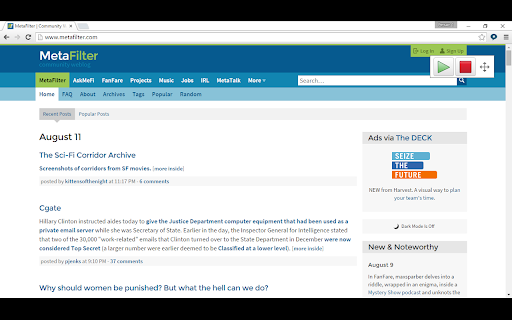
Speak any text on a website by selecting it, point with the mouse to hear text and links and captions, or click Play to hear sentences read out with highlighting to let you keep track of where you are.
Read Google Docs documents back to you so you can proof your work and fix any errors.
Speak accessible PDFs opened in Google Chrome with highlighting by clicking the Play button.
Hear letters, words or sentences spoken back as you type. Simply type in to web pages and hear what you type as you type it. For letters, hear the letter names or sounds spoken back to you, whichever helps you understand better.
Turn on a coloured overlay so pages are tinted to the colour you find easiest to read - no more glaring black on white text.
Change the speed of the spoken voice, slower for comprehension, faster for efficiency.
Activate word prediction to help you with writing and composition - find that elusive word you want. Now includes subject-specific prediction dictionaries and larger base dictionaries!
Read the contents of Google Docs extensions aloud so your support tools speak.
PREMIUM FEATURES!
Upgrade to a Premium subscription and also gain:
● Scan from Screen, so you can select inaccessible images like Google Books and hear them read aloud.
● Spelling and Homophone checking in Google Docs, Microsoft Office 365 Word Online and other editable text areas.
● Speech Recognition. Enter text in to documents and text areas of web pages through dictation.
● Reading with highlighting in Microsoft Office 365 Word.
● More online text-to-speech voices.
From the developers of ClaroRead for Mac and Windows and the ClaroSpeak and ClaroPDF Apps.
User Feedback

Philip Marryot
★★★★★
"It just does not work. I can sometimes get the pop up to appear so that I can get it to read aloud but most of the time I click the icon and it does nothing"

Harper Sandner
★★★★★
"it used to work just fine in just as just a chrome applecation but after it changed paret company or rebranding, idk dont care, it's just worthless now. have been useing it for close to 6 years and more and more things are just removed with no explonation. it just is not funktional anymore."

ella renting
★★★★★
"You removed the voice that i was using for English :(, it was name Zira or something. Hope it return in the next update if that happens i will give it 5 stars."
Top ClaroRead Chrome Alternatives
Compare pricing, features, and user reviews against the best ClaroRead Chrome competitors.


App Intel
DeveloperCLARO SOFTWARE LIMITED
Languages SupportedEnglish, Nederlands, español +3 more
Supportsupport@clarosoftware.com
ExtenIntel Curated
Hand-selected based on user adoption, feature quality, and store sentiment.