
Gallery
✨ ExtenIntel Summary
- •Effortlessly listen to webpages with natural-sounding text-to-speech.
- •Customize your experience with selective reading and diverse voice options.
- •Automatically detects languages for seamless multilingual support.
✓ Top Pros
× Top Cons
Full Developer Description
Introducing Read Aloud, the ultimate Chrome extension designed to revolutionize your reading experience. Whether you're browsing articles, studying documents, or simply exploring the web, Read Aloud empowers you with seamless text-to-speech functionality, transforming written content into immersive audio experiences.
Main features:
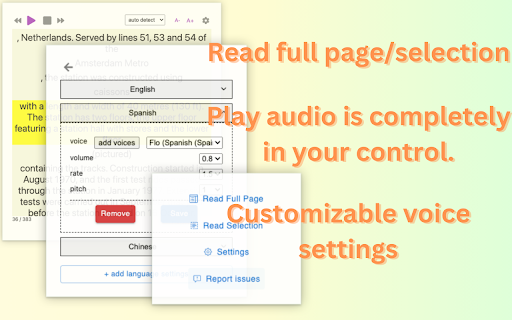
1. Effortless Reading: Simply activate Read Aloud to have webpages read aloud to you in clear, natural-sounding voices. Whether you're multitasking or prefer auditory learning, Read Aloud ensures you never miss out on valuable content.
2. Selective Reading: Choose specific sections of text to be read aloud, providing tailored accessibility and control over your listening experience. Highlight the portion you want to hear, and let Read Aloud take care of the rest.
3. Language Detection: Say goodbye to language barriers. Read Aloud automatically detects the language of the webpage content, ensuring accurate pronunciation and seamless transitions between multilingual texts.
4. Customizable Voices: Personalize your listening experience by configuring voice settings for multiple languages. Choose from a diverse range of voices, accents, and speech rates to suit your preferences and enhance comprehension.
5. Intuitive Controls: Take full command of your audio playback with intuitive controls that allow you to pause, rewind, or skip to the next section effortlessly. Stay in control of your listening pace and easily navigate through content with ease.
6. Accessibility-Focused: With accessibility in mind, Read Aloud empowers users with visual impairments or learning disabilities to access online content more conveniently. Break down barriers to information and enjoy a more inclusive browsing experience.
7. Seamless Integration: Seamlessly integrated into your Chrome browser, Read Aloud blends into your browsing routine effortlessly. Experience the convenience of instant text-to-speech functionality without interrupting your workflow.
Unlock the power of auditory learning and accessibility with Read Aloud - your go-to Chrome extension for immersive, customizable reading experiences. Whether you're enhancing productivity, overcoming language barriers, or simply enjoying hands-free browsing, Read Aloud is your indispensable companion on the web. Try it today and embark on a journey of effortless exploration and comprehension.
Any problem, contact us at hi-readaloud@iamheretoassistyou.cc
Top Read Aloud: Read webpage using text-to-speech Alternatives
Compare pricing, features, and user reviews against the best Read Aloud: Read webpage using text-to-speech competitors.
VS

Read full comparison →
VS

Read full comparison →
VS

Read full comparison →
VS

Read full comparison →
App Intel
DeveloperUnknown
Languages SupportedEnglish, Tiếng Việt, español +7 more
ExtenIntel Curated
Hand-selected based on user adoption, feature quality, and store sentiment.