
Gallery

✨ ExtenIntel Summary
- •Utilizes two advanced TTS engines: HTML5 Web Speech API and Kokoro AI for natural-sounding speech.
- •Offers both standalone interface and in-page text-to-speech functionality with easy text selection.
- •Kokoro AI works offline after initial download and allows saving TTS audio as .wav files.
✓ Top Pros
- • Easy to use and works effectively for many users.
- • Offers a clear and concise UK English voice option.
× Top Cons
- • Frequently stops working or cuts off during use.
- • Lacks speed control and has limited voice options.
Full Developer Description
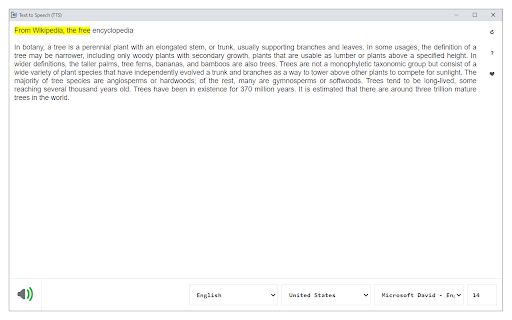
Text to Speech (TTS) is a text-to-speech extension with natural-sounding voices by using two different TTS engines.
The 1st engine is the HTML5 native web speech API for speech synthesis. It is active in all modern browsers by default (more info: https://webaudio.github.io/web-speech-api/). The 2nd API is the Kokoro AI engine, which uses a new artificial intelligence method to synthesize text (more info: https://huggingface.co/onnx-community/Kokoro-82M-v1.0-ONNX). Please note that when you choose Kokoro AI, the app needs to download training data (~300MB) for the AI engine. So please be patient while the app is loading.
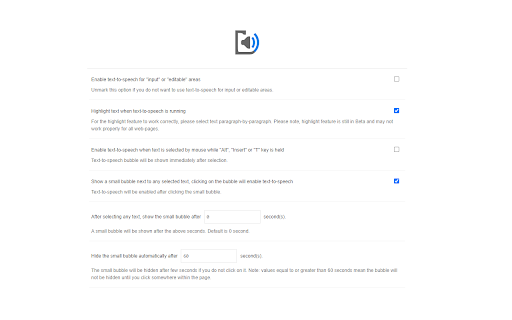
You can use this extension in a standalone interface or within web pages. If you press the toolbar button, the first interface opens up where you can enter the desired text for TTS. On the other hand, within a webpage, once you select a text, a placeholder speaker icon appears. Once you click the speaker icon, the text-to-speech starts. For the highlight feature to work correctly, please select text paragraph by paragraph. Please note that the highlight feature is still in Beta and may not work properly on all websites. There are also a few options related to the in-page text-to-speech, which can be adjusted from the extension settings page.
Note 1: For TTS in webpages, the app only uses the Web Speech API. Kokoro AI engine is only available within the standalone interface.
Note 2: Kokoro AI engine, once loaded, can work fully offline. Moreover, you can save the output TTS audio as a .wav file to your machine. When text-to-speech is completed, please press the audio icon on the right toolbar.
To report Bugs, please visit the addon's homepage (https://mybrowseraddon.com/text-to-speech.html) and fill out the bug report form.
User Feedback

Roemon “Roeclean” .C
★★★★★
"Pretty standard free to use text to speech browser extension. It also really helps that you can use United Kingdom speech to get clear and concise audio for your text. May consider chipping in some money towards the project if all the bugs are worked out. The bug I've noticed is that the different Uk english voice has trouble working after my computer wakes up from hibernating."

Dvir Zehavi
★★★★★
"Easy to use, and works. I have no complaints."

burr
★★★★★
"Like many say it is slow and should have a speed control but it is fine for me since I can't read fast anyways but I would like to change the voice and also the highlighting text function failed soon after it began."
Top Text to Speech (TTS) Alternatives
Compare pricing, features, and user reviews against the best Text to Speech (TTS) competitors.


App Intel
ExtenIntel Curated
Hand-selected based on user adoption, feature quality, and store sentiment.